Obstacle Cell
Overview
An Obstacle Cell completely blocks flow across all vertical layers from the riverbed to the water surface. Use this feature to represent solid structures that fully obstruct the flow, such as bridge piers, revetment foundations, and embankment cores.
Obstacle Top Elevation has been removed
The Obstacle Top Elevation setting available in previous versions has been removed. Obstacle cells now always block all vertical layers from bed to water surface.
For structures with a defined crest elevation that allows overflow (weirs, sills, abutments, etc.), use Structure BC instead.
When to Use: Obstacle Cell vs. Structure BC
| Obstacle Cell | Structure BC | |
|---|---|---|
| Set in | Cell Attribute | Boundary Condition |
| Height control | Always full-block | Partial block up to crest elevation |
| Overflow over crest | Not possible | Possible |
| Culvert opening | Not possible | Possible |
| Typical use | Bridge piers, complete solid walls | Weirs, sills, abutments, culvert bodies |
Setup Procedure in iRIC
Step 1: Select the Grid
Open the pre-processing screen in iRIC and select your simulation grid.
Step 2: Open Cell Attributes → Assign Obstacle Cells
From the menu or left panel, select Cell Attributes and choose Obstacle Cell. Draw a polygon over the target cells. In the dialog that appears, select Obstacle and click OK.
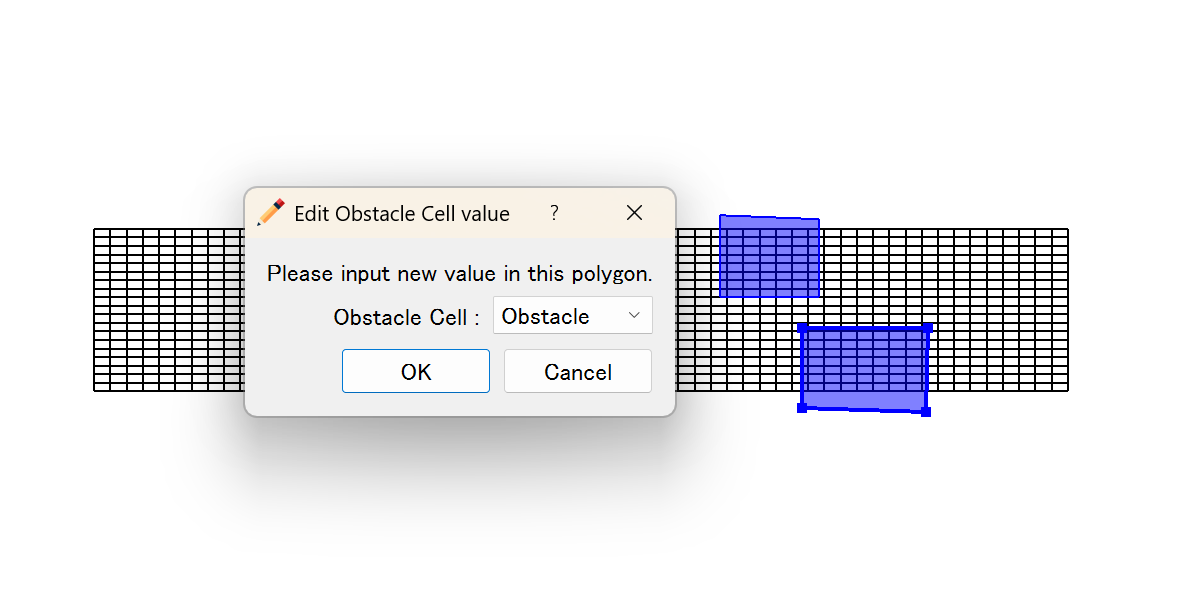
| Value | Label | Meaning |
|---|---|---|
0 |
Normal cell | Flow passes through freely |
1 |
Obstacle | All vertical layers blocked |
Step 3: Verify the Configuration
Use the 3D view to confirm that obstacle cells are correctly placed. All σ-layers at obstacle cells will be blocked.
How It Works in the Solver
- For each obstacle cell, all vertical layers k = 1 (bottom) through k = kmax (surface) have velocity forced to zero (
obst3d(i,j,k) = 1). - When a dry-cell condition (
hs < 0) occurs, the water surface is snapped to the bed elevationeta(i,j).
Notes
Migrating from Obstacle Top Elevation
If your project file contains Obstacle Top Elevation settings from a previous version, those values will be ignored. To reproduce a partial-height structure, create a new Structure BC group.
Combining with Structure BC
If you need a structure that is fully solid at its base but allows overflow above a certain elevation, use Structure BC rather than Obstacle Cell.